Author: BrianV

  • The Pin Numbers Are Backwards (not)

    The Pin Numbers Are Backwards (not)

    [et_pb_section fb_built=”1″ _builder_version=”3.22″ global_colors_info=”{}”][et_pb_row _builder_version=”3.25″ background_size=”initial” background_position=”top_left” background_repeat=”repeat” global_colors_info=”{}”][et_pb_column type=”4_4″ _builder_version=”3.25″ custom_padding=”|||” global_colors_info=”{}” custom_padding__hover=”|||”][et_pb_text _builder_version=”4.14.8″ background_size=”initial” background_position=”top_left” background_repeat=”repeat” hover_enabled=”0″ global_colors_info=”{}” sticky_enabled=”0″]I’ve heard from time-to-time, “The HobbyCNC guy got the pin numbers backwards“.

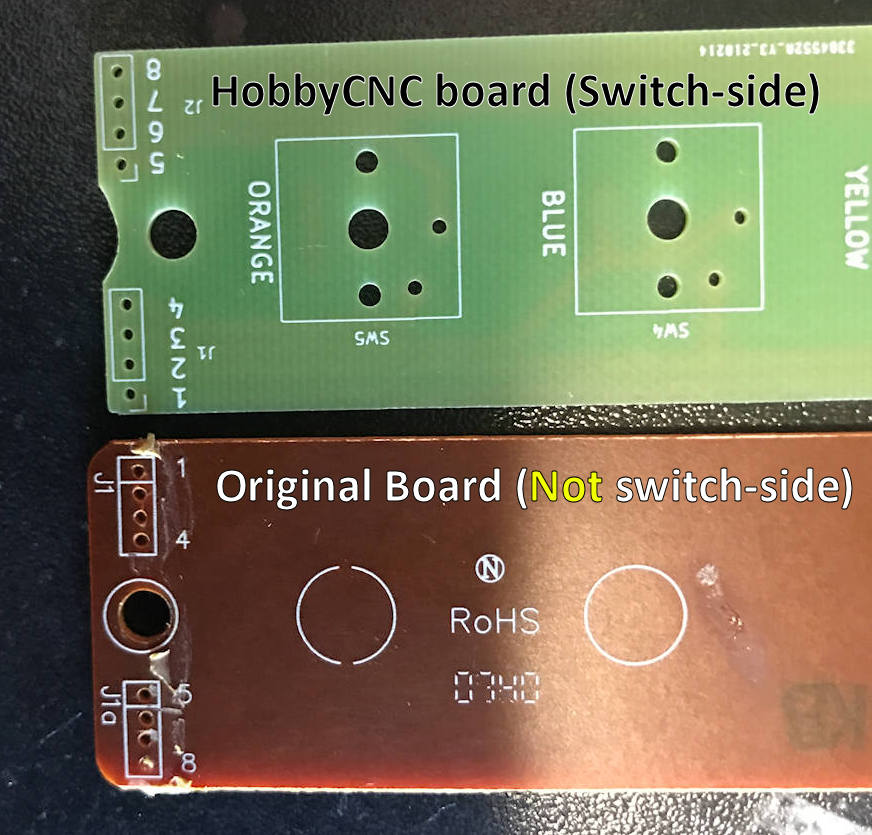
    Well, I grapple with that myself, so I get it. It’s not that they’re backwards, rather the board is ‘upside-down’.

    The confusion comes from the change in the design from the membrane switch to the mechanical switch. My boards have the circuit board traces on the opposite side that the original board does.

    Take a look at the image above. The pin numbers do indeed appear to be reversed! The trick, however, is that you are not looking at the same side of both boards. If the bottom (OEM) board is ‘up’ then the HobbyCNC board (top) is down-side-up. When you flip the HobbyCNC board right-side-down, it turns out the pin numbers are exactly right.

    The most important part is you DO NOT flip the ribbon cable – it goes back in pin-for-pin in exactly the same orientation as it was originally! Watch the video HobbyCNC Mechanical Fret upgrade, GH 04 install to see how it’s done.[/et_pb_text][/et_pb_column][/et_pb_row][/et_pb_section]

  • There is How Many Boards?

    There is How Many Boards?

    [et_pb_section fb_built=”1″ _builder_version=”4.14.7″ _module_preset=”default” custom_padding=”14px||27px|||” global_colors_info=”{}”][et_pb_row _builder_version=”4.14.7″ _module_preset=”default” custom_padding=”||7px|||” global_colors_info=”{}”][et_pb_column type=”4_4″ _builder_version=”4.14.7″ _module_preset=”default” global_colors_info=”{}”][et_pb_text _builder_version=”4.14.8″ _module_preset=”default” hover_enabled=”0″ global_colors_info=”{}” sticky_enabled=”0″]

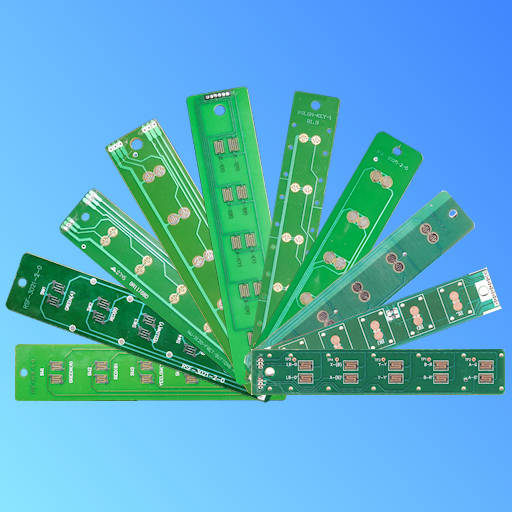
    Why are there so many Guitar Hero fret boards?

    Great question, and I’ve asked myself that many, many times. I don’t have an answer, only an educated guess. Different styles of guitars on different game systems developed at different times by different engineers.

    Each engineer (mechanical and electrical) have their own personal ‘way to do things’. So different hole spacings, different hole diameters, different circuit designs, different number of wires.

    Sometimes there are copyright or patents in the way, other times it is just stubborn pride “If you did it THAT way, then I’m gonna do it THIS way”.

    There’s no way to know for sure, but I’m thinking there’s still more variations out there . . . just waiting.

    [/et_pb_text][/et_pb_column][/et_pb_row][/et_pb_section]

  • How it Started

    How it Started

    [et_pb_section fb_built=”1″ _builder_version=”4.14.7″ _module_preset=”default” hover_enabled=”0″ global_colors_info=”{}” theme_builder_area=”post_content” custom_padding=”10px||10px||true|false” sticky_enabled=”0″][et_pb_row _builder_version=”4.14.7″ _module_preset=”default” hover_enabled=”0″ global_colors_info=”{}” theme_builder_area=”post_content” custom_margin=”0px||0px||true|false” custom_padding=”0px||0px||true|false” sticky_enabled=”0″][et_pb_column type=”4_4″ _builder_version=”4.14.7″ _module_preset=”default” global_colors_info=”{}” theme_builder_area=”post_content”][et_pb_text admin_label=”Text Intro” _builder_version=”4.14.7″ _module_preset=”default” hover_enabled=”0″ global_colors_info=”{}” theme_builder_area=”post_content” min_height=”129.2px” custom_padding=”20px||20px||true|false” sticky_enabled=”0″ custom_margin=”||-27px|||”]

    I’ve enjoyed playing Guitar Hero (X-Box 360) for many years. I was never ‘good’, but I had fun. When my grandkids were old enough, I started them on the game too. One of my Les Paul guitars was missing notes and it was making for an unpleasant learning experience.

    [/et_pb_text][/et_pb_column][/et_pb_row][et_pb_row column_structure=”3_5,2_5″ _builder_version=”4.14.7″ _module_preset=”default” global_colors_info=”{}” theme_builder_area=”post_content” custom_padding=”3px||14px|||”][et_pb_column type=”3_5″ _builder_version=”4.14.7″ _module_preset=”default” global_colors_info=”{}” theme_builder_area=”post_content”][et_pb_text admin_label=”Text CAD/CAM and HobbyCNC” _builder_version=”4.14.7″ _module_preset=”default” hover_enabled=”0″ global_colors_info=”{}” theme_builder_area=”post_content” sticky_enabled=”0″]

    CAD/CAM and HobbyCNC

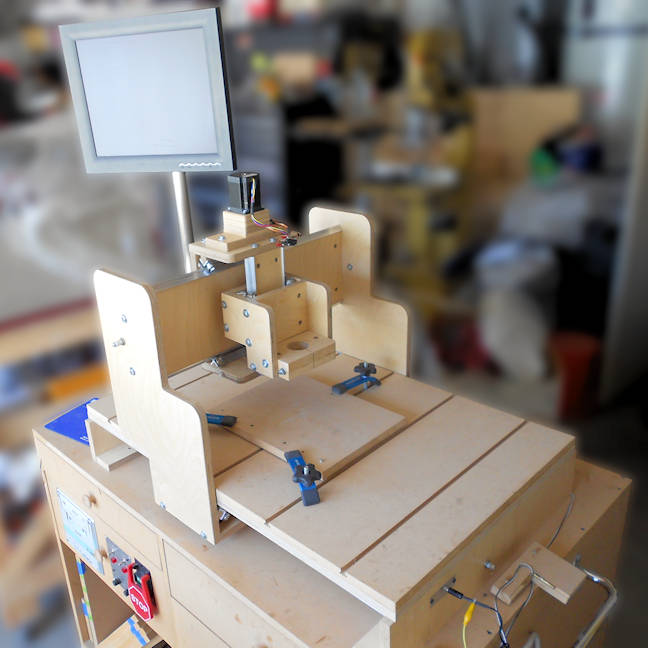
    I have a small 2.5 axis home-made CNC machine (shown above) that works fantastic for isolation routing PC Boards. I made a replacement mechanical fret PC Board and it worked great. I don’t really recall how the word got out (I think I put a post on Reddit), but the response has been crazy!

    [/et_pb_text][/et_pb_column][et_pb_column type=”2_5″ _builder_version=”4.14.7″ _module_preset=”default” global_colors_info=”{}” theme_builder_area=”post_content”][et_pb_image src=”https://hobbycnc.com/wp-content/uploads/2020/12/8_PBC_Bottom.jpg” alt=”Guitar Hero Fret Switch Upgrade – HobbyCNC” title_text=”8_PBC_Bottom” show_in_lightbox=”on” admin_label=”Image First HobbyCNC Guitar Hero PC Board” _builder_version=”4.14.7″ _module_preset=”default” border_radii=”on|10px|10px|10px|10px” global_colors_info=”{}” theme_builder_area=”post_content” custom_margin=”||3px|||”][/et_pb_image][et_pb_text admin_label=”Text” _builder_version=”4.14.7″ _module_preset=”default” global_colors_info=”{}” theme_builder_area=”post_content” custom_padding=”0px|||||”]

    First HobbyCNC Guitar hero PC Board, Isolation routed on my DIY CNC router.

    [/et_pb_text][/et_pb_column][/et_pb_row][et_pb_row _builder_version=”4.14.7″ _module_preset=”default” theme_builder_area=”post_content” custom_padding=”4px||13px|||”][et_pb_column _builder_version=”4.14.7″ _module_preset=”default” type=”4_4″ theme_builder_area=”post_content”][et_pb_text _builder_version=”4.14.7″ _module_preset=”default” theme_builder_area=”post_content” text_font=”Lato||||||||” hover_enabled=”0″ sticky_enabled=”0″]

    Since Then

    I have made replacement fret PCBs for 13 different guitar/system combinations. I ship boards all over the world. It’s a nice feeling knowing I’m helping to keep guitars up-and-running years after the manufacturers stopped production.

    What’s Next

    I’m looking at several other repair parts that might be needed, and I’m also looking at some of the Arduino / Clone Hero projects too. Too early to tell. 

    [/et_pb_text][/et_pb_column][/et_pb_row][/et_pb_section]

  • New Customer DIY CNC Build

    [et_pb_section fb_built=”1″ specialty=”on” _builder_version=”4.5.0″ _module_preset=”default” custom_padding=”20px||||false|false”][et_pb_column type=”3_4″ specialty_columns=”3″ _builder_version=”3.25″ custom_padding=”|||” custom_padding__hover=”|||”][et_pb_row_inner _builder_version=”4.5.0″ _module_preset=”default” background_color=”#3371a3″ custom_margin=”||||false|false” custom_padding=”||||false|false”][et_pb_column_inner saved_specialty_column_type=”3_4″ _builder_version=”4.5.0″ _module_preset=”default”][et_pb_text admin_label=”Header in blue background” _builder_version=”4.7.4″ text_font=”|700|||||||” text_text_color=”#ffffff” text_font_size=”30px” custom_margin=”|||10px|false|false” custom_padding=”|||10px|false|false”]

    Another Customer Build!

    [/et_pb_text][/et_pb_column_inner][/et_pb_row_inner][et_pb_row_inner _builder_version=”4.5.0″ _module_preset=”default”][et_pb_column_inner saved_specialty_column_type=”3_4″ _builder_version=”4.5.0″ _module_preset=”default”][et_pb_text admin_label=”Text” _builder_version=”4.9.0″ _module_preset=”default” hover_enabled=”0″ sticky_enabled=”0″]I’m always excited to see photos from a customer build. I think it’s helpful and motivating to see fellow DIY CNC’rs making progress on their projects!
    These photos are from Kevin M. He has put together a very nice system, including a monitor stand and base, as well as a very clean-and-neat electronics box.
    Well done!

    [button link=”https://hobbycnc.com/customer-builds/” newwindow=”yes”] See Kevin’s Build[/button]

    She plays with her hair
    Some consider this sign to be more of a myth, while others say that it is a law. But what is it about? Suppose she is talking to you and twirls a lock of hair between her fingers or winds it around her finger. This could be a signal that she is subconsciously flirting, or she is nervous when she talks to you. Most people worry about things that are important to them and that https://vibragame.net/chatroulette/ they don’t want to embarrass. But people are different, as has been said many times before. Some women tend to be shy and always brush their hair with their fingers whenever they talk to the opposite sex. So that could be pure quirk too. However, if you only observe this phenomenon when she is talking to you and not to another guy, it could very well be a sign of her interest in you.

    [/et_pb_text][et_pb_text _builder_version=”4.7.4″ _module_preset=”default”]

    Building your own CNC machine is fun and rewarding, although at times it can be frustrating, especially when waiting for UPS to deliver that part you need!

    Stick with it, it’s worth the wait. Finishing your build is only the beginning!

    [/et_pb_text][/et_pb_column_inner][/et_pb_row_inner][/et_pb_column][et_pb_column type=”1_4″ _builder_version=”3.25″ custom_padding=”|||” custom_padding__hover=”|||”][et_pb_sidebar area=”et_pb_widget_area_2″ _builder_version=”4.5.0″ _module_preset=”default” header_text_color=”#ffffff” header_font_size=”21px” body_font_size=”12px” body_line_height=”1.6em” background_layout=”dark” custom_margin=”20px||||false|false” custom_css_widget=”background: #3371a3;||padding: 20px;|| “][/et_pb_sidebar][/et_pb_column][/et_pb_section]
  • 3d Printer Filament Storage

    [et_pb_section fb_built=”1″ specialty=”on” _builder_version=”4.5.0″ _module_preset=”default” custom_padding=”20px||||false|false”][et_pb_column type=”3_4″ specialty_columns=”3″ _builder_version=”3.25″ custom_padding=”|||” custom_padding__hover=”|||”][et_pb_row_inner _builder_version=”4.5.0″ _module_preset=”default” background_color=”#3371a3″ custom_margin=”||||false|false” custom_padding=”||||false|false”][et_pb_column_inner saved_specialty_column_type=”3_4″ _builder_version=”4.5.0″ _module_preset=”default”][et_pb_text admin_label=”Header in blue background” _builder_version=”4.7.4″ text_font=”|700|||||||” text_text_color=”#ffffff” text_font_size=”30px” custom_margin=”|||10px|false|false” custom_padding=”|||10px|false|false”]Inexpensive 3d Printer Filament Storage[/et_pb_text][/et_pb_column_inner][/et_pb_row_inner][et_pb_row_inner _builder_version=”4.5.0″ _module_preset=”default”][et_pb_column_inner saved_specialty_column_type=”3_4″ _builder_version=”4.5.0″ _module_preset=”default”][et_pb_text admin_label=”Text” _builder_version=”4.7.4″ _module_preset=”default”]

    I found an inexpensive storage container for my 3D printing filament (8″ diameter spool). It’s a 2 gallon plastic paint bucket from Home Depot. It has a lid (extra cost) that seals nice and tight. Very little wasted space.

    They also have an even less expensive 2 gallon Homer Bucket that might work well too, but I don’t have the dimensions.

    [/et_pb_text][et_pb_gallery gallery_ids=”19527,19524,19526,19525,19523″ posts_number=”5″ show_title_and_caption=”off” show_pagination=”off” admin_label=”Image Gallery” _builder_version=”4.7.4″ _module_preset=”default”][/et_pb_gallery][/et_pb_column_inner][/et_pb_row_inner][/et_pb_column][et_pb_column type=”1_4″ _builder_version=”3.25″ custom_padding=”|||” custom_padding__hover=”|||”][et_pb_sidebar area=”et_pb_widget_area_2″ _builder_version=”4.5.0″ _module_preset=”default” header_text_color=”#ffffff” header_font_size=”21px” body_font_size=”12px” body_line_height=”1.6em” background_layout=”dark” custom_margin=”20px||||false|false” custom_css_widget=”background: #3371a3;||padding: 20px;|| “][/et_pb_sidebar][/et_pb_column][/et_pb_section]
  • Handy Measuring Jigs

    [et_pb_section fb_built=”1″ specialty=”on” _builder_version=”4.5.0″ _module_preset=”default” custom_padding=”20px||||false|false”][et_pb_column type=”3_4″ specialty_columns=”3″ _builder_version=”3.25″ custom_padding=”|||” custom_padding__hover=”|||”][et_pb_row_inner _builder_version=”4.5.0″ _module_preset=”default” background_color=”#3371a3″ custom_margin=”||||false|false” custom_padding=”||||false|false”][et_pb_column_inner saved_specialty_column_type=”3_4″ _builder_version=”4.5.0″ _module_preset=”default”][et_pb_text admin_label=”Header in blue background” _builder_version=”4.5.8″ text_font=”|700|||||||” text_text_color=”#ffffff” text_font_size=”30px” custom_margin=”|||10px|false|false” custom_padding=”|||10px|false|false”]Handy Measurement Jigs[/et_pb_text][/et_pb_column_inner][/et_pb_row_inner][et_pb_row_inner _builder_version=”4.5.0″ _module_preset=”default” custom_padding=”||11px|||”][et_pb_column_inner saved_specialty_column_type=”3_4″ _builder_version=”4.5.0″ _module_preset=”default”][et_pb_text _builder_version=”4.5.8″ _module_preset=”default”]

    When I’ve got free time, I love to play around with 3D printing, my HobbyCNC DIY Router and electronics. There is that point in the design where the schematic (or drawing) needs to turn into a real, physical product, and, like most hobbyists/makers, I’ve got a collection of parts that aren’t always well organized, or some part I need to match or duplicate. So I made a couple of quick-and-dirty measurement tools that work great for me!

    [/et_pb_text][/et_pb_column_inner][/et_pb_row_inner][et_pb_row_inner column_structure=”1_2,1_2″ _builder_version=”4.2.1″ min_height=”162px” custom_margin=”||12px|||” custom_padding=”12px||0px|||”][et_pb_column_inner type=”1_2″ saved_specialty_column_type=”3_4″ _builder_version=”4.2.1″][et_pb_text _builder_version=”4.5.8″ _module_preset=”default”]

    It’s never clear to me if that machine screw is an M4 or a 8-32, an M3 or a 4-40.

    Super simple design, simple assembly, small and handy. 2″ x 1/8″ x 8.6″.

    [/et_pb_text][/et_pb_column_inner][et_pb_column_inner type=”1_2″ saved_specialty_column_type=”3_4″ _builder_version=”4.2.1″][et_pb_image src=”https://hobbycnc.com/wp-content/uploads/2020/08/IMG_7198_Small.jpg” title_text=”IMG_7198_Small” show_in_lightbox=”on” admin_label=”Image: Thread pitch measurement” _builder_version=”4.5.8″ custom_margin=”||0px|||”][/et_pb_image][et_pb_text _builder_version=”4.5.8″ _module_preset=”default”]Click for larger image.[/et_pb_text][/et_pb_column_inner][/et_pb_row_inner][et_pb_row_inner column_structure=”1_2,1_2″ _builder_version=”4.2.1″ min_height=”140px” custom_margin=”||2px|||” custom_padding=”0px|||||”][et_pb_column_inner type=”1_2″ saved_specialty_column_type=”3_4″ _builder_version=”4.2.1″][et_pb_text admin_label=”Text” _builder_version=”4.5.8″]

    I’ve got drawers of parts that have accumulated over time. Many without data sheets, and it’s always a chore to identify the exact pin pitch (spacing between leads).

    So I whipped-up a tool to help identify the pitch quickly and accurately.

    [/et_pb_text][/et_pb_column_inner][et_pb_column_inner type=”1_2″ saved_specialty_column_type=”3_4″ _builder_version=”4.2.1″][et_pb_image src=”https://hobbycnc.com/wp-content/uploads/2020/08/Ruler_Rev2_Small.jpg” alt=”DIY CNC, HobbyCNC, PC Board Isolation Routing” title_text=”Ruler_Rev2_Small” show_in_lightbox=”on” admin_label=”Image: pin pitch ruler” _builder_version=”4.5.8″ custom_margin=”||-1px|||”][/et_pb_image][et_pb_text _builder_version=”4.5.8″ _module_preset=”default”]Click for larger image.[/et_pb_text][/et_pb_column_inner][/et_pb_row_inner][/et_pb_column][et_pb_column type=”1_4″ _builder_version=”3.25″ custom_padding=”|||” custom_padding__hover=”|||”][et_pb_sidebar area=”et_pb_widget_area_2″ _builder_version=”4.5.0″ _module_preset=”default” header_text_color=”#ffffff” header_font_size=”21px” body_font_size=”12px” body_line_height=”1.6em” background_layout=”dark” custom_margin=”20px||||false|false” custom_css_widget=”background: #3371a3;||padding: 20px;|| “][/et_pb_sidebar][/et_pb_column][/et_pb_section]

  • Anti Backlash Design Change!

    [et_pb_section fb_built=”1″ specialty=”on” _builder_version=”4.5.0″ _module_preset=”default” custom_padding=”4px|||||”][et_pb_column type=”3_4″ specialty_columns=”3″ _builder_version=”3.25″ custom_padding=”|||” custom_padding__hover=”|||”][et_pb_row_inner _builder_version=”4.5.0″ _module_preset=”default” background_color=”#3371a3″ custom_margin=”||||false|false” custom_padding=”||||false|false”][et_pb_column_inner _builder_version=”4.5.0″ _module_preset=”default” saved_specialty_column_type=”3_4″][et_pb_text admin_label=”Header in blue background” _builder_version=”4.5.0″ text_font=”|700|||||||” text_text_color=”#ffffff” text_font_size=”30px” custom_margin=”|||10px|false|false” custom_padding=”|||10px|false|false” hover_enabled=”0″]Anti-Backlash Improvement[/et_pb_text][/et_pb_column_inner][/et_pb_row_inner][et_pb_row_inner column_structure=”1_2,1_2″ _builder_version=”4.5.0″ _module_preset=”default” custom_margin=”-16px|||||”][et_pb_column_inner type=”1_2″ saved_specialty_column_type=”3_4″ _builder_version=”4.5.0″ _module_preset=”default”][et_pb_text _builder_version=”4.5.0″ _module_preset=”default” hover_enabled=”0″]

    I developed a simple-yet-effective backlash preventer for my DIY CNC Router plans. The design uses a coupling nut with a flange welded on. This is fixed to the gantry.

    A spring is ‘pinched’ between this coupling nut and a simple square nut. The square nut is prevented from turning by two L brackets.

    I use my mill to isolation-route PC board prototypes. It works great. Except for one thing I didn’t consider. The Z axis goes up-and-down just a few tenths of an inch frequently. A lot of movement in a little range.

    [/et_pb_text][/et_pb_column_inner][et_pb_column_inner type=”1_2″ saved_specialty_column_type=”3_4″ _builder_version=”4.5.0″ _module_preset=”default”][et_pb_image src=”https://hobbycnc.com/wp-content/uploads/2016/08/Axis-Nut-w_backlash_exploded.jpg” alt=”HobbyCNC Axis Nut w_backlash_exploded (Rev 0)” title_text=”Axis Nut w_backlash_exploded” _builder_version=”4.5.0″ _module_preset=”default” custom_margin=”||-32px|||”][/et_pb_image][/et_pb_column_inner][/et_pb_row_inner][et_pb_row_inner column_structure=”1_2,1_2″ _builder_version=”4.5.0″ _module_preset=”default” custom_margin=”|auto|29px|auto||” custom_padding=”||0px|||”][et_pb_column_inner type=”1_2″ saved_specialty_column_type=”3_4″ _builder_version=”4.5.0″ _module_preset=”default”][et_pb_text _builder_version=”4.5.0″ _module_preset=”default”]

    The failure point is to the threaded rod where it goes through the square nut. A lot of pressure in a small number of threads. My Z axis threaded rod stripped out, letting the tool drop into the PC Board and stay there, through the rapid moves and all.

    Good thing I can quickly tell by the awful sound that something went wrong.

    The PC board and the tool were shot, but the mill was fine.

    [/et_pb_text][/et_pb_column_inner][et_pb_column_inner type=”1_2″ saved_specialty_column_type=”3_4″ _builder_version=”4.5.0″ _module_preset=”default”][et_pb_image src=”https://hobbycnc.com/wp-content/uploads/2020/07/Failed_Threads.jpg” alt=”HobbyCNC.com – damaged threads to axis drive screw” title_text=”Failed_Threads” admin_label=”Image” _builder_version=”4.5.0″ _module_preset=”default” custom_margin=”||-59px|||” custom_padding=”||31px|||”][/et_pb_image][/et_pb_column_inner][/et_pb_row_inner][et_pb_row_inner column_structure=”1_2,1_2″ _builder_version=”4.5.0″ _module_preset=”default” min_height=”302px” custom_padding=”||0px|||”][et_pb_column_inner type=”1_2″ saved_specialty_column_type=”3_4″ _builder_version=”4.5.0″ _module_preset=”default”][et_pb_text admin_label=”Text” _builder_version=”4.5.0″ _module_preset=”default”]

    My solution is to eliminate the square nut and L brackets, and just use a second coupling-nut-assembly.

    This second coupling nut and flange are NOT attached to the gantry, and it is prevented from spinning due to the welded-on flange.

    Works identically, but I’m hoping the LOTS of extra threads will save the threaded rod! I’ll let you know in another 5-or-so years!

    [/et_pb_text][/et_pb_column_inner][et_pb_column_inner type=”1_2″ saved_specialty_column_type=”3_4″ _builder_version=”4.5.0″ _module_preset=”default”][et_pb_image src=”https://hobbycnc.com/wp-content/uploads/2020/07/Kit-Parts-Small-Rev01.jpg” alt=”HobbyCNC Anti Backlash prevention device, Rev01″ title_text=”Kit-Parts-Small Rev01″ admin_label=”Image” _builder_version=”4.5.0″ _module_preset=”default” custom_margin=”||19px|||” custom_padding=”||11px|||”][/et_pb_image][/et_pb_column_inner][/et_pb_row_inner][et_pb_row_inner column_structure=”1_2,1_2″ _builder_version=”4.5.0″ _module_preset=”default” min_height=”301px” custom_margin=”|auto|-159px|auto||” custom_padding=”0px|||||”][et_pb_column_inner type=”1_2″ saved_specialty_column_type=”3_4″ _builder_version=”4.5.0″ _module_preset=”default”][et_pb_text admin_label=”Text” _builder_version=”4.5.0″ _module_preset=”default”]

    Here’s how it looks installed on the back of my Z axis gantry.

    The bottom, white one is my original design from many years ago. Notice this one is screwed to the Z-axis gantry.

    The top, black bracket, is holding compression of the spring, and it is NOT fixed to the gantry, but it is prevented from spinning by the flange resting against the back of the Z-axis gantry.

    The net result is the Z-axis gantry is always being “pushed down”, away from the top, ‘floating’ coupling nut assembly.

    [/et_pb_text][/et_pb_column_inner][et_pb_column_inner type=”1_2″ saved_specialty_column_type=”3_4″ _builder_version=”4.5.0″ _module_preset=”default”][et_pb_image src=”https://hobbycnc.com/wp-content/uploads/2020/07/New-Antibacklash-installed.jpg” alt=”HobbyCNC Anti backlash drive nut, rev 01″ title_text=”New Antibacklash installed” admin_label=”Image” _builder_version=”4.5.0″ _module_preset=”default” custom_margin=”||6px|||” custom_padding=”||16px|||”][/et_pb_image][/et_pb_column_inner][/et_pb_row_inner][et_pb_row_inner column_structure=”1_2,1_2″ _builder_version=”4.5.0″ _module_preset=”default”][et_pb_column_inner type=”1_2″ saved_specialty_column_type=”3_4″ _builder_version=”4.5.0″ _module_preset=”default”][et_pb_text admin_label=”A quick note” _builder_version=”4.5.0″ _module_preset=”default”]

    A quick note on threads. My DIY CNC Router is specifically designed to be inexpensive, and a such, uses ¼-20 all-thread threaded rod as the drive screw. This thread profile is shown at the top of the image.

    However, this type of thread is not designed for the efficient power transmission. Ideally, you want an Acme or square thread, but these do tend to get pricey. Your call!

    [/et_pb_text][/et_pb_column_inner][et_pb_column_inner type=”1_2″ saved_specialty_column_type=”3_4″ _builder_version=”4.5.0″ _module_preset=”default”][et_pb_image src=”https://hobbycnc.com/wp-content/uploads/2020/07/ThreadTypes.jpg” alt=”HobbyCNC Examples of thread shape/type” title_text=”ThreadTypes” admin_label=”Image” _builder_version=”4.5.0″ _module_preset=”default” custom_margin=”||-62px|||”][/et_pb_image][/et_pb_column_inner][/et_pb_row_inner][/et_pb_column][et_pb_column type=”1_4″ _builder_version=”3.25″ custom_padding=”|||” custom_padding__hover=”|||”][et_pb_sidebar area=”et_pb_widget_area_2″ _builder_version=”4.5.0″ _module_preset=”default” header_text_color=”#ffffff” header_font_size=”21px” body_font_size=”12px” body_line_height=”1.6em” background_layout=”dark” custom_margin=”20px||||false|false” custom_css_widget=”background: #3371a3;||padding: 20px;|| “][/et_pb_sidebar][/et_pb_column][/et_pb_section]

  • First Test of HobbyCNC PRO board with Arduino & GRBL

    [et_pb_section fb_built=”1″ specialty=”on” _builder_version=”4.5.0″ _module_preset=”default” custom_padding=”15px|||||”][et_pb_column type=”3_4″ specialty_columns=”3″ _builder_version=”3.25″ custom_padding=”|||” custom_padding__hover=”|||”][et_pb_row_inner _builder_version=”4.5.0″ _module_preset=”default” background_color=”#3371a3″ custom_margin=”||||false|false” custom_padding=”||||false|false”][et_pb_column_inner saved_specialty_column_type=”3_4″ _builder_version=”4.5.0″ _module_preset=”default”][et_pb_text admin_label=”Header in blue background” _builder_version=”4.5.0″ text_font=”|700|||||||” text_text_color=”#ffffff” text_font_size=”30px” custom_margin=”|||10px|false|false” custom_padding=”|||10px|false|false” hover_enabled=”0″]Arduino / GRBL First Test[/et_pb_text][/et_pb_column_inner][/et_pb_row_inner][et_pb_row_inner column_structure=”1_2,1_2″ _builder_version=”4.2.1″ min_height=”346px” custom_padding=”12px||0px|||”][et_pb_column_inner type=”1_2″ saved_specialty_column_type=”3_4″ _builder_version=”4.2.1″][et_pb_text _builder_version=”4.2.1″ custom_margin=”||-3px|||” custom_padding=”||0px|||”]

    I’ve been planning for a while now to test the Arduino Uno and the GRBL CAM software with my HobbyCNC PRO board. I was certain it would interface, but I wasn’t keen on having to learn all the bits necessary to get it working.

    1. Upload/Flash the GRBL image to the UNO.
    2. Find a G-Code “Sender”.
    3. Understand the core GRBL configuration settings.
    4. Solder a test cable from the Ardunio to the HobbyCNC PRO
    5. Load a sample G-Code file and test

    And I’ll be damned if it doesn’t work great!  I still need to make adjustments for speed, acceleration, etc, test the motor enable, and lots more. But, for “right out of the box”, the damn thing worked!

    [/et_pb_text][/et_pb_column_inner][et_pb_column_inner type=”1_2″ saved_specialty_column_type=”3_4″ _builder_version=”4.2.1″][et_pb_image src=”https://hobbycnc.com/wp-content/uploads/2020/01/UnoR3.jpg” _builder_version=”4.2.1″][/et_pb_image][/et_pb_column_inner][/et_pb_row_inner][et_pb_row_inner column_structure=”1_2,1_2″ _builder_version=”4.2.1″ custom_padding=”0px|||||”][et_pb_column_inner type=”1_2″ saved_specialty_column_type=”3_4″ _builder_version=”4.2.1″][et_pb_text admin_label=”Text” _builder_version=”4.2.2″]

    Here’s a video of the initial test. So far only the Step and Direction for X, Y and Z-axis are connected. Most of the GRBL settings are “right out of the box”. This is all connected to a board on my Bed of Nails test jig.

    I’ve still got to set parameters for steps per rotation and microstepping and such, as well as testing the stepper enable and limit switches and stuff. I plan to make a “shield” that will connect the Arduino to a 25pin female connector compatible with the HobbyCNC PRO pinouts.

    You can find more information on the HobbyCNC PRO and Arduino page.

    [/et_pb_text][/et_pb_column_inner][et_pb_column_inner type=”1_2″ saved_specialty_column_type=”3_4″ _builder_version=”4.2.1″][et_pb_video src=”https://hobbycnc.com/wp-content/uploads/2020/01/Img-6592-1-1.mp4″ _builder_version=”4.2.1″][/et_pb_video][/et_pb_column_inner][/et_pb_row_inner][/et_pb_column][et_pb_column type=”1_4″ _builder_version=”3.25″ custom_padding=”|||” custom_padding__hover=”|||”][et_pb_sidebar area=”et_pb_widget_area_2″ _builder_version=”4.5.0″ _module_preset=”default” header_text_color=”#ffffff” header_font_size=”21px” body_font_size=”12px” body_line_height=”1.6em” background_layout=”dark” custom_margin=”20px||||false|false” custom_css_widget=”background: #3371a3;||padding: 20px;|| “][/et_pb_sidebar][/et_pb_column][/et_pb_section]

  • Testing Assembled HobbyCNC PRO Boards

    [et_pb_section fb_built=”1″ specialty=”on” _builder_version=”4.5.0″ _module_preset=”default” custom_padding=”17px|||||”][et_pb_column type=”3_4″ specialty_columns=”3″ _builder_version=”3.25″ custom_padding=”|||” custom_padding__hover=”|||”][et_pb_row_inner _builder_version=”4.5.0″ _module_preset=”default” background_color=”#3371a3″ custom_margin=”||||false|false” custom_padding=”||||false|false” min_height=”90px”][et_pb_column_inner saved_specialty_column_type=”3_4″ _builder_version=”4.5.0″ _module_preset=”default”][et_pb_text admin_label=”Header in blue background” _builder_version=”4.5.0″ text_font=”|700|||||||” text_text_color=”#ffffff” text_font_size=”30px” custom_margin=”|||10px|false|false” custom_padding=”|||10px|false|false” hover_enabled=”0″]Production Testing Assembled Boards[/et_pb_text][/et_pb_column_inner][/et_pb_row_inner][et_pb_row_inner _builder_version=”3.27.2″ custom_padding=”0px||0px||false|false”][et_pb_column_inner _builder_version=”3.27.2″ saved_specialty_column_type=”3_4″][et_pb_text _builder_version=”3.27.4″ custom_margin=”17px|||||”]

    I decided to offer assembled HobbyCNC PRO boards. As it turns out, not all of my customers are handy with a soldering iron, or they want their results quicker! So I build the boards, by hand, 10 at a time. Not a big deal. Testing them, however, is a big deal. I test these boards under full power – four motors at 3 amps each. That’s 24 screw terminals, plus 2 for power and 2 for the fan.

    So I decided to build a ‘board of nails’ tester using my 3D printer to make the framework and my CNC router to make the PC board.

    I purchased the spring test (pogo) pins from a Chinese supplier on eBay, though I found this electronic components database afterwards that I may make use of next time. These are small (33mm x 1.36mm dia) spring-loaded pins with an aggressive head on them, designed to make good electrical contact on uneven surfaces.

    [/et_pb_text][et_pb_text _builder_version=”3.27.4″]

    [/et_pb_text][/et_pb_column_inner][/et_pb_row_inner][et_pb_row_inner column_structure=”1_3,1_3,1_3″ _builder_version=”3.27.2″ custom_margin=”0px||0px||false|false” custom_padding=”0px||0px||false|false”][et_pb_column_inner type=”1_3″ _builder_version=”3.27.2″ saved_specialty_column_type=”3_4″][et_pb_image src=”https://hobbycnc.com/wp-content/uploads/2019/08/s-l1600.jpg” admin_label=”bunch of Pogo Pins” _builder_version=”3.27.2″ custom_margin=”||||false|false” custom_padding=”0px||0px||false|false” min_height=”208px”][/et_pb_image][et_pb_text admin_label=”Text” _builder_version=”3.27.4″ custom_padding=”0px||0px||false|false”]

    Fig 1 – Bunch of Pogo Pins.

    [/et_pb_text][/et_pb_column_inner][et_pb_column_inner type=”1_3″ _builder_version=”3.27.2″ saved_specialty_column_type=”3_4″][et_pb_image src=”https://hobbycnc.com/wp-content/uploads/2019/08/s-l1600-1.jpg” admin_label=”Two Pogo Pins” _builder_version=”3.27.2″ custom_padding=”0px||0px||false|false”][/et_pb_image][et_pb_text _builder_version=”3.27.4″ custom_padding=”0px||0px||false|false”]

    Fig 2 – Fewer Pogo Pins.

    [/et_pb_text][/et_pb_column_inner][et_pb_column_inner type=”1_3″ _builder_version=”3.27.2″ saved_specialty_column_type=”3_4″][et_pb_image src=”https://hobbycnc.com/wp-content/uploads/2019/08/s-l1600-2.jpg” admin_label=”One Pogo Pin” _builder_version=”3.27.2″ custom_padding=”0px||0px||false|false”][/et_pb_image][et_pb_text _builder_version=”3.27.4″ custom_padding=”0px||0px||false|false”]

    Fig 3 – Pogo Pin dimensions.

    [/et_pb_text][/et_pb_column_inner][/et_pb_row_inner][et_pb_row_inner _builder_version=”3.27.2″ custom_margin=”0px||0px||false|false” custom_padding=”0px||0px||false|false”][et_pb_column_inner _builder_version=”3.27.2″ saved_specialty_column_type=”3_4″][et_pb_text admin_label=”Frame Text” _builder_version=”3.27.4″ min_height=”59px” custom_margin=”10px||0px||false|false” custom_padding=”6px||0px|||”]

    So I decided to build a ‘board of nails’ tester using my 3D printer to make the framework and my CNC router to make the PC board.

    [/et_pb_text][/et_pb_column_inner][/et_pb_row_inner][et_pb_row_inner column_structure=”1_3,1_3,1_3″ _builder_version=”3.27.2″ custom_margin=”0px||0px||false|false” custom_padding=”0px||0px||false|false”][et_pb_column_inner type=”1_3″ _builder_version=”3.27.2″ saved_specialty_column_type=”3_4″][et_pb_image src=”https://hobbycnc.com/wp-content/uploads/2019/08/PogoBoardFrame1.jpg” show_in_lightbox=”on” admin_label=”Pogo Board Frame Image” _builder_version=”3.27.2″ min_height=”83px” custom_margin=”||0px|||”][/et_pb_image][et_pb_text admin_label=”Fig 4 caption” _builder_version=”3.27.4″ custom_padding=”0px||0px||false|false”]

    Fig 4 – 3D printed pogo board support frame

    [/et_pb_text][/et_pb_column_inner][et_pb_column_inner type=”1_3″ _builder_version=”3.27.2″ saved_specialty_column_type=”3_4″][et_pb_image src=”https://hobbycnc.com/wp-content/uploads/2019/08/PogoBoardFrame2.jpg” show_in_lightbox=”on” admin_label=”Pogo Board Frame 2 Image” _builder_version=”3.27.2″ custom_margin=”||1px|||”][/et_pb_image][et_pb_text admin_label=”Fig 5 Caption” _builder_version=”3.27.4″ custom_padding=”0px||0px||false|false”]

    Fig 5 – Pogo board details showing pogo pin supports and alignment/mounting pin for board-under-test.

    [/et_pb_text][/et_pb_column_inner][et_pb_column_inner type=”1_3″ _builder_version=”3.27.2″ saved_specialty_column_type=”3_4″][et_pb_image src=”https://hobbycnc.com/wp-content/uploads/2019/08/PogoBoardFrame3.jpg” show_in_lightbox=”on” admin_label=”Pogo Board Frame 3 Image” _builder_version=”3.27.2″ custom_margin=”||1px|||”][/et_pb_image][et_pb_text admin_label=”Fig 6 caption” _builder_version=”3.27.4″ custom_padding=”0px||10px||false|false”]

    Fig 6 – Underside of Board-Under-Test showing Pogo Pins resting on the motor driver connectors and power connector.

    [/et_pb_text][/et_pb_column_inner][/et_pb_row_inner][et_pb_row_inner _builder_version=”3.27.2″ custom_padding=”0px||0px||false|false”][et_pb_column_inner _builder_version=”3.27.2″ saved_specialty_column_type=”3_4″][et_pb_text _builder_version=”3.27.4″ custom_padding=”0px||0px||false|false”]Under the frame, I made a PC board. Since I need to be able to replace any pogo pins that might fail or get damaged, I designed the PC board “upside down”, that is with all the components on the copper side. So far I’ve had to replace two pogo pins, and the design worked perfectly. I added a 24VDC regulator so I can power a fan also.

    I added three inexpensive voltmeter modules to give me real-time readings as the board is being tested.

    The PC board to test slides down on the four corner alignment pins and the side clips come over to hold the board. The volume of pogo pins is large enough to bow the board under test, so I need to install the heatsink before testing to ensure the board being tested lies flat.[/et_pb_text][/et_pb_column_inner][/et_pb_row_inner][et_pb_row_inner column_structure=”1_3,1_3,1_3″ _builder_version=”3.27.2″][et_pb_column_inner type=”1_3″ _builder_version=”3.27.2″ saved_specialty_column_type=”3_4″][et_pb_image src=”https://hobbycnc.com/wp-content/uploads/2019/08/PCB1-1.jpg” show_in_lightbox=”on” admin_label=”PCB1″ _builder_version=”3.27.2″ custom_margin=”0px||0px||false|false” custom_padding=”0px||0px||false|false”][/et_pb_image][et_pb_text admin_label=”Fig 7 caption” _builder_version=”3.27.4″ custom_padding=”6px||10px||false|false”]

    Fig 7 – PC Board assembly started. All parts are mounted on the ‘wrong’ side in case service is needed.

    [/et_pb_text][/et_pb_column_inner][et_pb_column_inner type=”1_3″ _builder_version=”3.27.2″ saved_specialty_column_type=”3_4″][et_pb_image src=”https://hobbycnc.com/wp-content/uploads/2019/08/PCB2.jpg” show_in_lightbox=”on” admin_label=”PCB2″ _builder_version=”3.27.2″ custom_margin=”0px||0px||false|false” custom_padding=”0px||0px||false|false”][/et_pb_image][et_pb_text admin_label=”Fig 8 caption” _builder_version=”3.27.4″ custom_padding=”6px||10px||false|false”]

    Fig 8 – Assembly is complete. Jumpers necessary because this is a single-sided PCB.

    [/et_pb_text][/et_pb_column_inner][et_pb_column_inner type=”1_3″ _builder_version=”3.27.2″ saved_specialty_column_type=”3_4″][et_pb_image src=”https://hobbycnc.com/wp-content/uploads/2019/08/PCB3.jpg” show_in_lightbox=”on” admin_label=”PCB3″ _builder_version=”3.27.2″ custom_margin=”0px||0px||false|false” custom_padding=”0px||0px||false|false”][/et_pb_image][et_pb_text admin_label=”Fig 9 caption” _builder_version=”3.27.4″ custom_padding=”6px||10px||false|false”]

    Fig 9 – All assembled and Board-Under-Test is in place. Volt meters read raw voltage in (29.9V), fan voltage (24.1V) and logic voltage (5.0V)

    [/et_pb_text][/et_pb_column_inner][/et_pb_row_inner][et_pb_row_inner _builder_version=”3.27.2″ custom_padding=”0px||0px||false|false”][et_pb_column_inner _builder_version=”3.27.2″ saved_specialty_column_type=”3_4″][et_pb_text _builder_version=”3.27.4″ custom_padding=”0px||0px||false|false” custom_margin=”||-12px|||”]

    I hooked everything up to my test jig (power supply and motors). I run each board through a series of tests at full current (3 Amps). To make sure no steps are missed, I made little pointers. These pointers need to finish pointing the same direction (Left two motors are paired to one axis and the right two motors to the other axis).

    After successful testing, the heatsink is removed, the pots are dialed-back to about the middle and the board is packaged for shipment.

    [/et_pb_text][/et_pb_column_inner][/et_pb_row_inner][et_pb_row_inner column_structure=”1_2,1_2″ _builder_version=”3.27.2″][et_pb_column_inner type=”1_2″ _builder_version=”3.27.2″ saved_specialty_column_type=”3_4″][et_pb_image src=”https://hobbycnc.com/wp-content/uploads/2019/08/Pointers.jpg” admin_label=”Pointers” _builder_version=”3.27.2″ custom_margin=”0px||0px||false|false” custom_padding=”0px||0px||false|false”][/et_pb_image][et_pb_text admin_label=”Fig 10 caption” _builder_version=”3.27.4″ custom_padding=”0px||10px||false|false”]

    Fig 10 – small, 3D printed arrows help me ensure there are no skipped steps.

    [/et_pb_text][/et_pb_column_inner][et_pb_column_inner type=”1_2″ _builder_version=”3.27.2″ saved_specialty_column_type=”3_4″][et_pb_video src=”https://www.youtube.com/watch?v=e6z7A8So8kQ” _builder_version=”3.27.2″ custom_margin=”||7px|||”][/et_pb_video][et_pb_text admin_label=”Video caption” _builder_version=”3.27.4″ custom_padding=”0px||10px||false|false”]

    Video – Short video of part of a HobbyCNC PRO test sequence.

    [/et_pb_text][/et_pb_column_inner][/et_pb_row_inner][/et_pb_column][et_pb_column type=”1_4″ _builder_version=”3.25″ custom_padding=”|||” custom_padding__hover=”|||”][et_pb_sidebar area=”et_pb_widget_area_2″ _builder_version=”4.5.0″ _module_preset=”default” header_text_color=”#ffffff” header_font_size=”21px” body_font_size=”12px” body_line_height=”1.6em” background_layout=”dark” custom_margin=”20px||||false|false” custom_css_widget=”background: #3371a3;||padding: 20px;|| “][/et_pb_sidebar][/et_pb_column][/et_pb_section]

  • No More Bent Leads: IC Tubing Cutter

    [et_pb_section fb_built=”1″ specialty=”on” _builder_version=”4.5.0″ _module_preset=”default” custom_padding=”19px|||||”][et_pb_column type=”3_4″ specialty_columns=”3″ _builder_version=”3.25″ custom_padding=”|||” custom_padding__hover=”|||”][et_pb_row_inner _builder_version=”4.5.0″ _module_preset=”default” background_color=”#3371a3″ custom_margin=”||||false|false” custom_padding=”||||false|false”][et_pb_column_inner saved_specialty_column_type=”3_4″ _builder_version=”4.5.0″ _module_preset=”default”][et_pb_text admin_label=”Header in blue background” _builder_version=”4.5.0″ text_font=”|700|||||||” text_text_color=”#ffffff” text_font_size=”30px” custom_margin=”|||10px|false|false” custom_padding=”|||10px|false|false”]Avoiding Bent Pins[/et_pb_text][/et_pb_column_inner][/et_pb_row_inner][et_pb_row_inner _builder_version=”3.25″ background_size=”initial” background_position=”top_left” background_repeat=”repeat” custom_padding=”18px|||||”][et_pb_column_inner saved_specialty_column_type=”3_4″ _builder_version=”3.25″ custom_padding=”|||” custom_padding__hover=”|||”][et_pb_text admin_label=”Text” _builder_version=”3.27.4″ background_size=”initial” background_position=”top_left” background_repeat=”repeat” min_height=”460px” custom_margin=”||-41px|||”]

    Sometimes the answer is in the trash.

    The background: while assembling a batch of HobbyCNC PRO boards, I was noticing how neatly the 23-pin driver chip dropped into the PC board. Then I had one chip with one lead, just one, slightly out of alignment. That particular chip was a lot more work to get it into the board.

    Then I realized that how I’ve been shipping my kits with 3-or-4 driver chips dropped into an antistatic bag. This pretty much guaranteed mis-aligned pins on these driver chips after shipping. Not cool for my customers. Then it hit me. Rather than just throw-away the plastic tubes in which I receive the chips – how about I cut them into 3-or-4 chip-length “mini tubes” and ship the chips safely inside these new, shortened tubes.

    The idea worked great, but trying to cut the tubes by using a ruler to measure the length each time was slow and inaccurate.

    3D printer to the rescue. Now, I do love my DIY CNC machine, but sometimes you’ve got to add material, not remove it! I designed a platform to fit my old Sears Handi-cut tool.This tool has a removable lower platform that is held in place by a single screw.

    I designed (Fusion 360) and made (MakerBot Replicator 2X) a platform with two stops (a fixed stop for a 4-IC tube, and a removable stop for a 3-IC tube. It works great, it’s fast, safe and accurate!

    Damn I love CAD/CAM

    [/et_pb_text][/et_pb_column_inner][/et_pb_row_inner][et_pb_row_inner column_structure=”1_2,1_2″ _builder_version=”3.25″][et_pb_column_inner type=”1_2″ saved_specialty_column_type=”3_4″ _builder_version=”3.25″ custom_padding=”|||” custom_padding__hover=”|||”][et_pb_image src=”https://hobbycnc.com/wp-content/uploads/2019/04/Tubing_Cutter_Dwg.jpg” show_in_lightbox=”on” align_tablet=”center” align_phone=”” align_last_edited=”on|desktop” admin_label=”Drawing” _builder_version=”3.23″ custom_margin=”||3px|||”][/et_pb_image][et_pb_text admin_label=”caption” _builder_version=”3.27.4″]

    Drawing & Measurements (Fusion 360)

    [/et_pb_text][/et_pb_column_inner][et_pb_column_inner type=”1_2″ saved_specialty_column_type=”3_4″ _builder_version=”3.25″ custom_padding=”|||” custom_padding__hover=”|||”][et_pb_image src=”https://hobbycnc.com/wp-content/uploads/2019/04/Cutter_and_Chips.jpg” show_in_lightbox=”on” align_tablet=”center” align_phone=”” align_last_edited=”on|desktop” admin_label=”Photo of tool” _builder_version=”3.23″ custom_margin=”||4px|||”][/et_pb_image][et_pb_text admin_label=”Caption” _builder_version=”3.27.4″]

    Measuring tool attached to the cutter with 3-and-4 IC tubes.

    [/et_pb_text][/et_pb_column_inner][/et_pb_row_inner][/et_pb_column][et_pb_column type=”1_4″ _builder_version=”3.25″ custom_padding=”|||” custom_padding__hover=”|||”][et_pb_sidebar area=”et_pb_widget_area_2″ _builder_version=”4.5.0″ _module_preset=”default” header_text_color=”#ffffff” header_font_size=”21px” body_font_size=”12px” body_line_height=”1.6em” background_layout=”dark” custom_margin=”20px||||false|false” custom_css_widget=”background: #3371a3;||padding: 20px;|| “][/et_pb_sidebar][/et_pb_column][/et_pb_section]